Running a successful WordPress website involves much more than choosing an attractive theme or publishing high-quality content. Whether you are a freelancer, agency owner, developer, or entrepreneur, your website depends on reliable tools that improve security, performance, user experience, and productivity. While the WordPress repository offers thousands of free plugins, there comes a point when free solutions are no longer enough to meet professional needs. This is where WordPress Paid Plugins become a smart investment.
Premium plugins provide advanced functionality, regular updates, dedicated customer support, and better compatibility with modern WordPress websites. They also help website owners reduce maintenance issues while protecting valuable digital assets. Instead of installing several free plugins to perform different tasks, a single premium solution often delivers everything needed in one package.
For freelancers, security is especially important. Client projects contain valuable files, confidential information, custom designs, and countless hours of work. Losing access to these assets because of malware, poor security practices, or outdated software can damage both your reputation and your business. Choosing the right WordPress Paid Plugins helps create a secure and reliable environment where you can focus on delivering exceptional work instead of worrying about technical problems.
At Open Talk Magazine, we believe premium plugins should be viewed as investments rather than expenses. The right plugin not only saves time but also improves website stability, strengthens security, and supports long-term business growth.
Table of Contents
Why WordPress Paid Plugins Are Worth Buying
Every website owner eventually asks the same question: are premium wordpress paid Plugins really worth the cost? The answer depends on your goals, but for professional websites the answer is usually yes.
Unlike free plugins that may have limited features or infrequent updates, WordPress Paid Plugins are designed for users who need reliability. Premium developers actively maintain their products, release security patches quickly, and ensure compatibility with the latest WordPress versions.
For freelancers and agencies, every hour spent fixing plugin conflicts or searching for workarounds costs valuable time. Paid plugins reduce these problems by providing complete solutions backed by professional support teams.
Premium plugins also help websites load faster, improve security, automate repetitive tasks, and deliver a better user experience. Over time, these benefits easily justify the initial investment.
Why Security Should Be Your First Priority
Before investing in marketing, design, or advanced functionality, every website owner should secure their website.
WordPress powers millions of websites worldwide, making it one of the most popular targets for cybercriminals. Automated bots continuously scan websites searching for outdated plugins, weak passwords, insecure login pages, and vulnerable software.
Installing reliable WordPress security plugins is one of the most effective ways to reduce these risks.
A quality security plugin for WordPress provides malware scanning, firewall protection, login security, suspicious activity monitoring, vulnerability detection, and real-time alerts. These features help prevent attacks before they become serious problems.
For businesses handling customer information, investing in security is not optional. It is an essential part of protecting your reputation and maintaining customer trust.
WordPress Security for Freelancers
Freelancers face unique challenges that many traditional businesses do not experience.
Managing multiple client websites, handling sensitive login credentials, maintaining backups, and protecting project files all require careful planning.
Improving WordPress Security for Freelancers starts with establishing secure workflows. Strong passwords, two-factor authentication, reliable backups, limited administrator access, and trusted hosting providers create a solid foundation for website protection.
Professional freelancers also benefit from premium security solutions because they simplify website monitoring while reducing maintenance time.
By combining secure development practices with trusted WordPress Paid Plugins, freelancers can confidently deliver projects while minimizing unnecessary risks.
Protect WordPress Website Files
Every successful website represents significant effort.
Custom designs, optimized content, plugin configurations, graphics, databases, and development work all contribute to the final product.
Learning how to Protect WordPress Website Files should therefore become part of every professional workflow.
Reliable backup systems ensure data can be restored if something goes wrong.
Access control prevents unauthorized users from modifying important files.
Security monitoring detects suspicious activity before it affects website performance.
Premium security plugins also help identify vulnerabilities that could expose sensitive website information.
Rather than reacting after problems occur, proactive protection keeps projects secure throughout their entire lifecycle.
Choosing the Right Security Plugin for WordPress
Not every plugin offers the same level of protection.
A high-quality security plugin for WordPress should provide comprehensive security without slowing down your website.
Look for features such as malware scanning, web application firewall protection, brute-force attack prevention, login monitoring, two-factor authentication, file integrity monitoring, vulnerability detection, and automatic security updates.
The best WordPress WP security plugin should also integrate smoothly with caching plugins, backup tools, SEO plugins, and page builders.
Compatibility is just as important as security because plugin conflicts can create unnecessary technical problems.
Choosing well-maintained plugins from reputable developers significantly reduces these risks.
Best WordPress Security Plugins 2026
As cyber threats continue evolving, website owners must keep their security strategies up to date.
Many experts expect the best WordPress security plugins 2026 to include artificial intelligence for threat detection, automated vulnerability scanning, improved firewall technology, and stronger login protection.
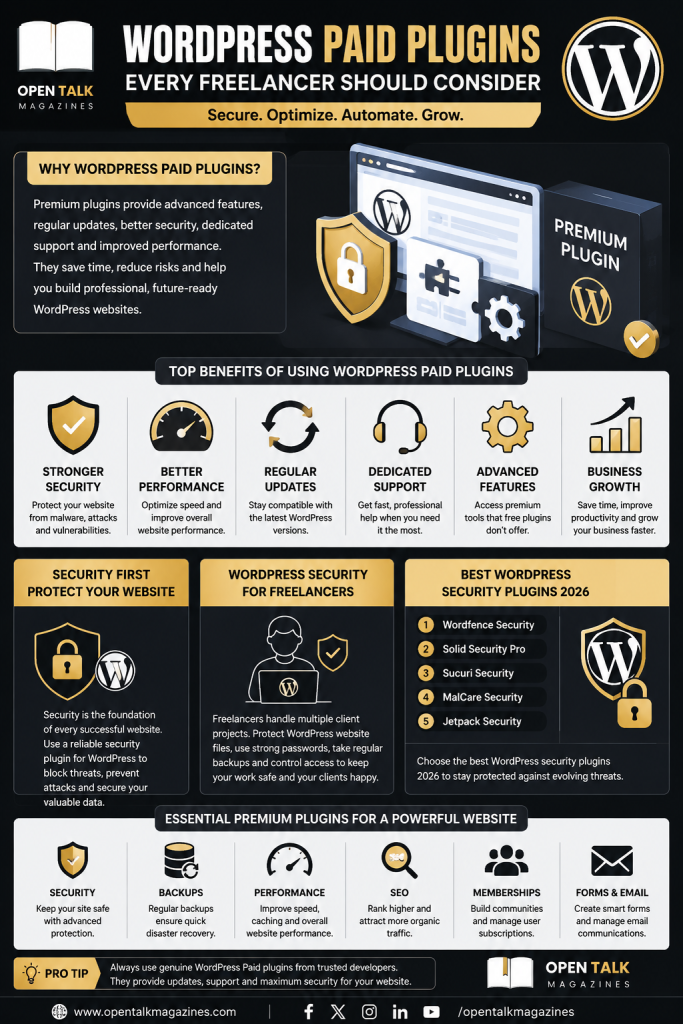
Solutions such as Wordfence Premium, Solid Security Pro, MalCare, Sucuri Security, and Jetpack Security continue leading the industry by providing comprehensive website protection.
Each plugin offers different strengths, making it important to choose one that matches your specific business requirements.
Freelancers managing multiple client websites often prioritize centralized management, while online stores may focus on payment security and customer data protection.
Regardless of your niche, investing in trusted WordPress Paid Plugins helps create a safer and more reliable website.
Building a Professional Plugin Stack
Successful WordPress websites rarely depend on a single plugin.
Instead, professionals build a balanced plugin stack that covers security, SEO, backups, caching, forms, image optimization, analytics, and performance.
This approach keeps websites organized while avoiding unnecessary software conflicts.
Rather than installing dozens of free plugins with overlapping functionality, choosing a few reliable WordPress Paid Plugins often produces better results.
Quality always delivers more value than quantity when building a professional WordPress website.
How Premium Plugins Improve Productivity
Productivity is one of the biggest reasons professionals invest in WordPress Paid Plugins. Every minute spent troubleshooting plugin conflicts, fixing security issues, or searching for missing features is time that could be used to serve clients or grow a business.
Premium plugins simplify website management by offering complete solutions with dedicated support and regular updates. Instead of relying on multiple free tools, website owners can manage security, performance, backups, memberships, SEO, and optimization through trusted products that work together efficiently.
Freelancers benefit even more because premium tools reduce repetitive tasks and improve project management. A secure website is easier to maintain, clients experience fewer technical problems, and developers spend more time creating value instead of fixing avoidable issues.
Common Mistakes When Buying Plugins
One of the biggest mistakes WordPress users make is purchasing plugins without researching the developer. Before investing in any premium solution, check when it was last updated, whether it is compatible with the latest version of WordPress, and how responsive the support team is.
Another common mistake is installing too many plugins. Even high-quality plugins should only be added if they solve a genuine problem. Too many unnecessary plugins can reduce website performance and increase maintenance requirements.
Website owners should also avoid downloading nulled or pirated premium plugins. These unofficial copies often contain hidden malware, outdated code, or security vulnerabilities that put your website at risk. Buying genuine WordPress Paid Plugins ensures you receive updates, documentation, and professional support while protecting your website from unnecessary threats.
Choosing the Best Plugin for Your Needs
Every website has different requirements, so there is no single plugin that works perfectly for everyone. Bloggers may prioritize SEO and performance, while agencies often need advanced security and backup solutions. Membership websites require tools that manage subscriptions and user access, whereas online stores need payment security and reliable checkout functionality.
When selecting WordPress Paid Plugins, focus on long-term value rather than the initial purchase price. A premium plugin that saves hours of work every month is often far more valuable than a free alternative that requires constant maintenance.
If security is your priority, choose a trusted WordPress WP security plugin with firewall protection, malware scanning, login security, and continuous monitoring. If your goal is business growth, look for plugins that improve conversions, automate workflows, and enhance the overall user experience.
Why Security Remains Essential
Cyber threats continue evolving every year, making website security more important than ever. Even small websites can become targets for automated attacks that attempt to exploit outdated software or weak passwords.
Installing reliable WordPress security plugins significantly reduces these risks while improving confidence for both website owners and visitors. Combined with strong hosting, regular updates, secure backups, and two-factor authentication, a quality security plugin for WordPress creates a strong foundation for long-term website protection.
For independent professionals, improving WordPress Security for Freelancers also means protecting project files, securing client data, maintaining professional credibility, and reducing downtime. Taking a proactive approach to website protection is always more effective than trying to recover after an attack.
The Future of WordPress Security
The future of WordPress security will be driven by smarter technologies and stronger automation. Many of the best WordPress security plugins 2026 are already incorporating artificial intelligence to detect suspicious behavior, identify vulnerabilities, and respond to emerging threats more quickly.
As websites become more advanced, premium security solutions will continue offering deeper protection without sacrificing performance. Businesses, agencies, and freelancers who invest in trusted tools today will be better prepared for tomorrow’s security challenges.
Choosing reliable WordPress Paid Plugins is therefore not just about solving today’s problems but also about preparing your website for future growth.
Conclusion
Choosing the right WordPress Paid Plugins can transform the way you build, manage, and protect your website. Premium solutions provide stronger security, better performance, regular updates, and professional support that free alternatives often cannot match.
For freelancers and agencies, investing in website protection is particularly important. Strengthening WordPress Security for Freelancers, learning how to Protect WordPress Website Files, and using trusted WordPress security plugins help reduce risks while creating a more reliable workflow.
Whether you need a dependable security plugin for WordPress, an advanced WordPress WP security plugin, or simply want to build a faster and more secure website, choosing premium tools is a decision that pays off over time.
At Open Talk Magazine, we recommend focusing on quality, reliability, and long-term value when selecting plugins. A carefully chosen set of premium tools will help you create a secure, professional, and future-ready WordPress website that performs well today and continues to grow in the years ahead.
FAQs
Q1: Are Security Plugins Worth It?
A1:Yes. Security plugins protect your WordPress website from malware, brute-force attacks, vulnerabilities, and unauthorized access, making them one of the most valuable investments for any website owner.
Q2: Better Security Plug-Ins That Are Free?
A2: Several excellent free options are available, including Wordfence Free, Solid Security, and All In One WP Security. They provide strong basic protection, while premium versions unlock more advanced features.
Q3: What Are Your Top Security Plugins for WordPress Sites?
A3: Some of the most trusted choices include Wordfence Premium, Solid Security Pro, MalCare, Sucuri Security, and Jetpack Security because they offer comprehensive protection, regular updates, and strong reputations within the WordPress community.
Q4: Best Free Security Plugin?
A4: Wordfence Free remains one of the best free security plugins thanks to its malware scanner, login protection, firewall capabilities, and active development.
Q5: What Is the Best WordPress Security Plugin in 2026?
A5: While the ideal choice depends on your website’s needs, Wordfence Premium is widely considered one of the best WordPress security plugins 2026 because of its advanced firewall, real-time threat intelligence, and malware protection.
Q6: New to WordPress Development — What Are the Must-Have Security & Admin Plugins?
A6: New WordPress developers should install a security plugin, backup plugin, SEO plugin, caching plugin, spam protection plugin, image optimization tool, and activity log plugin to build a secure, fast, and well-managed website.